
Making it public
This page is about what happens after you have made a version playable: how you ask for a review of it, who approves it, how it becomes the public version, and what can be undone.
⚠ Read the Who approves it section before you ask for a review. The request has a real consequence, it sends a notice to the team, and it cannot be taken back.
Three separate steps
Three different things can reach the players in the Builder, and each has its own name: you publish the rules, you make the components playable, and you make public a version. These are three separate steps, and none of them comes with another.
| Step | In the interface | What it does | What it does not do |
|---|---|---|---|
| Publishing the rules | the Publish button in the Rules page header | the rule text reaches every player at once, whatever version they use, running parties included | it does not make a version, and it does not open anything to outsiders |
| Making it playable | Make playable | a snapshot of the draft’s components (sets, items, images): that makes the version exist as a private version, and a party can be started on it, by you and by the people you shared it with | nobody from the outside sees it, and it does not publish the rules either |
| Making it public | the Public item of the version row’s ”…” menu | you declare that an already playable version is “the” current version | it does not make a new version, does not publish the rules, and does not make the game discoverable |
The rules are described on the Rules page, making a version playable on the
Draft and versions page. The tags on the cards in the games list follow the same
difference: Unpublished changes is about the rules, Changes not playable yet about the components,
see The Games page.
⚠ The Publish button does not put the game into the controller’s game chooser. The button takes the rules out, not the game: who finds the game is not decided by making it public either, see What “public” means in practice.
Making a version public needs an approved review of the game, not of the version. So you have to get the review once, on the game; after that you can make any version public without a further request.
Where you find it
The Review card is in the right-hand column of the Versions page: the state’s tag in it, a short explanation, and, if you can ask right now, the Request review button.
The same state appears as a tag on the newest live version’s row as well, because that is where making it public is decided.
The last point of the Overview page’s Ready to make playable? list is this too: Approved for public play, and the Fix this button brings you straight here.
The four states
| State | What you see on the card | What you can do |
|---|---|---|
| no request | Not reviewed: “We review the game once. After that you can make any of your versions public, and new versions are not reviewed again.” | Request review |
| pending | Review pending: “We are looking at your game. This usually takes a few days. A version can only be made public once the review is done.” | wait |
| approved | Reviewed: “The game is reviewed. You can make any version public, and new versions are not reviewed again.” | Public is live in the row’s ”…” menu |
| rejected | Review rejected: “Fix what we wrote to you, then ask for a new review.” | Request review again |
Until the state is Reviewed, the Public item of the row’s ”…” menu is greyed out, and the
reason stands under it: “A version can only be made public once the game has been reviewed.”
⚠ The reason for a rejection does not show in the Builder. The card only says to fix what we wrote: the feedback is in the message that arrives in your account, not here.
⚠ The card does not refresh by itself. It reads the state when the page opens. If you leave the Builder open while the review is going on, the approval will not appear: reload the page.
Requesting a review
It starts from one place: the button on the Review card. The review belongs to the game, not to a version, so a version’s ”…” menu has no such item.
After you press the button, a brief Sending the request… shows, then the Review requested.
confirmation, and the state switches to pending.
Two things happen then:
- The game’s state goes to pending.
- The team gets a notice about the game and about you, and the review starts with that.
⚠ The request cannot be taken back. There is no “never mind” in the interface: once you have sent it, the state stays pending until somebody sets it over by hand. So only ask for a review on a real game if you really want to.
While the review is pending, or once it has been approved, the menu item and the button are greyed out: you cannot ask twice.
Only the game’s owner can ask for a review
The server ties the request to the game’s owner. If you reached the game through a group or an organisation, it turns the request down even if you can otherwise edit the game.
If the request does not go through, the interface says what went wrong. If you are not sure the game is yours: the Access page only appears for the owner, which is the simplest test.
Who approves it
The GreenCloth team decides on the request, outside the Builder. The approval happens by hand, and there is no button for it in the Builder or in any other interface you can reach.
What of that concerns you:
- There is no promised turnaround. The card says only that this usually takes a few days.
- The feedback arrives in your account, as a message; the account row in the sidebar then shows an unread-message indicator. The state itself shows on the Versions page, and only if you reload the page.
Making it public
After an approved review, the Public item of the ”…” menu is live on the row of every
non-deprecated version.
What it takes:
- the version is playable and not deprecated (the draft cannot be made public);
- the game’s review is approved;
- the Publish a version permission on the game. The owner has it; somebody else can get it from a role in the group or the organisation. Without it the item is greyed out;
- the game is a my own design. A
Purchased copycannot be made public: the item is greyed out and the server refuses it too, see Where it comes from.
Making a version public is part of the Pro plan. What counts is the plan of the game’s
owner, not of whoever clicks. On the Free and Plus plans a version stays private, for your
testers: the Public item is greyed out with a lock and a Pro tag, and under the menu one sentence
says why, with a See plans link. The server refuses it too. Private always works, whatever the
plan.
A version that was already public before this rule stays public. The rule only applies to a new make-public, so if you are on Free or Plus and take it off, or pick another version, you need Pro to make one public again.
What it does: it sets on the game that this is the current version. The row gets a Public tag,
and the interface confirms it: “The version is public now.”
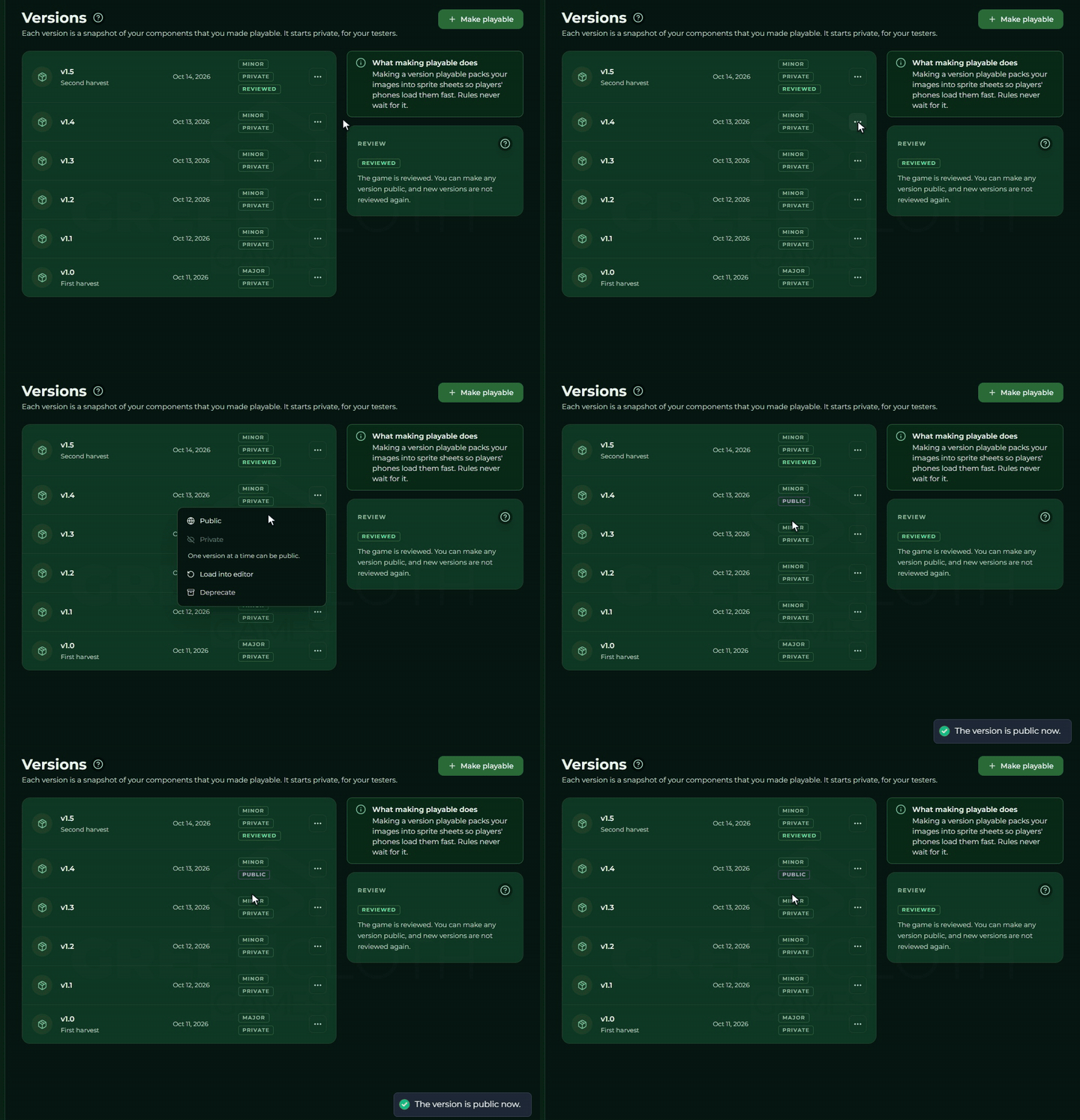
Exactly one version at a time can be public. Make another one public and it takes the place over from the previous one, you do not have to take that one off first. This sentence stands under the menu as well: “One version at a time can be public.”
While a version is public, it cannot be deprecated: Deprecate in the
”…” menu is greyed out, and the help text says why.
Taking it off public
The Private item of the ”…” menu ends the public state: from then on the game has no
designated current version. There is no confirming question, the menu item acts at once, and the
interface only confirms: “The version is private again.”
The version itself is left intact; it can be made public again at any time, and you do not have to ask for the review again either.
What happens to running parties
Running parties carry on working. Neither taking it off nor deprecating it breaks them off. The interface spells that out in the deprecation question: “Running parties keep working.”
Why: a party picks a version when it starts, and remembers which one. From then on it asks for the content against that version, even if the server restarts in the meantime. And versions are never overwritten and never deleted, only their state changes.
What all of this affects is the next party: which version loads when it starts.
- There is a public version → that one starts.
- There is not → the newest, non-deprecated version starts.
- There is no version at all → no party starts. A party never starts from the draft, so even a test run needs a version.
What “public” means in practice
What making it public certainly does:
- It designates the parties’ default version, see above.
- It opens the version to outsiders. For anybody who is not the owner and does not reach it through a group or an organisation, the public version is the only one of the game’s versions that exists. While there is no public version, not one version is visible from the outside.
What it does not do, though its name would lead you to expect it:
⚠ The game does not get into the controller’s game chooser because of it. The chooser shows the list the game’s access allows: your own games, and whatever you reached through a group. Making it public opens a version, it does not make the game discoverable. So if the aim is for somebody to find the game, add it to a group, see Groups.
⚠ The branded game page does not live off it either. A game page tied to your own domain shows the game the domain belongs to, and does not look at whether it has a public version, see Website.
A usual run of things
- The draft is ready → make a version playable.
- Try it: start a party with the game, look at it on the display and on the controller. A party only starts from a version, never from the draft.
- Fix things if you need to, and make a new version playable. The old versions’ content is never overwritten, but whether they stay live depends on the game owner’s package: with the Multiple game versions permission (from the Pro package) they do, without it a new version deprecates the earlier live ones.
- When the game is in a state to go public: Request review. That is a one-off step on the game.
- After approval, ”…” → Public on the version you mean the parties to have.
- On later versions only step 5 repeats: you do not have to ask for the review again.